> For the complete documentation index, see [llms.txt](https://wiki.crosswatch.app/llms.txt). Markdown versions of documentation pages are available by appending `.md` to page URLs; this page is available as [Markdown](https://wiki.crosswatch.app/crosswatch/settings/configure-pairs/global-settings.md).
# Global settings
Pair-wide safety switches and advanced guardrails.
Global settings apply to the **whole pair**.
They control planning safety, write verification, and delete propagation.
### Settings
{% hint style="success" %}
Normally it’s not needed to change any settings here. The defaults are just fine for most users.
{% endhint %}
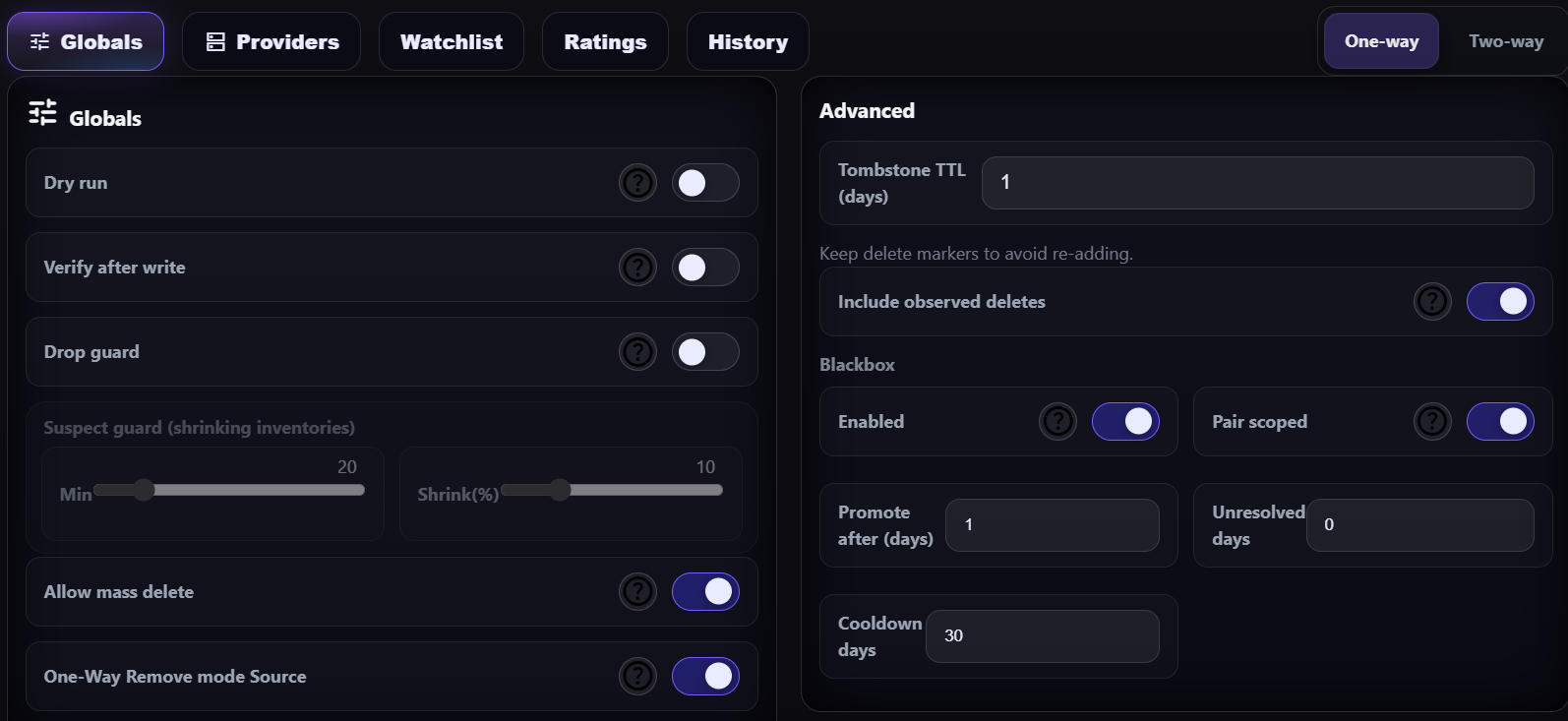
* **Dry run**: plan only during normal syncs. In [Interactive Sync](https://wiki.crosswatch.app/crosswatch/main-dashboard/interactive-sync.md#apply-selected-changes), you can explicitly confirm a one-time write of the selected changes while global dry run stays on.
* **Verify after write**: re-check a small sample after writes.
* **Drop guard**: pauses delete plans after a sudden source inventory drop, including an empty source snapshot.
* **Allow mass delete**: allows bulk removals when needed.
* **One-Way Remove mode (Deletions based on Source)**: controls how deletes behave in **one-way** pairs.
* **Tombstone retention (days)**: keeps delete markers to avoid re-adding items.
* **Include observed deletes**: treats provider-side deletions as intentional.
{% hint style="warning" %}
Allow **Mass Delete** is enabled by default because it’s often needed for the very first sync.
Once your pairs are stable, you can disable it for extra safety.
You cannot enable both **Mass Delete** and **Drop guard** at the same time.
{% endhint %}
#### One-Way Remove mode (Deletions based on Source)
This setting controls how CrossWatch plans removals for **one-way** pairs.
It does nothing unless **Remove** is enabled for the feature.
Features that commonly use this:
* Watchlist deletes
* Ratings clears
* Progress clears (where supported)
**Source** (default)
* UI: **Deletions based on Source** = **ON**
* Config: `one_way_remove_mode = "source_deletes"`
* Removes items when a source deletion is detected relative to the saved state. Destination-only items are not removed just because they are absent from the source.
**Mirror**
* UI: **Deletions based on Source** = **OFF**
* Config: `one_way_remove_mode = "mirror"`
* Destination strictly follows source. This will delete destination-only items.
{% hint style="warning" %}
Mirror mode is destructive.
Use it only when you want strict mirroring. Normally you don't need this.
{% endhint %}
### Blackbox (advanced)
Blackbox is a staging area for uncertain changes.
Use it when:
* IDs are unstable.
* Providers “flap” (adds keep reappearing).
* You want a cooldown before applying removals.
#### Blackbox settings
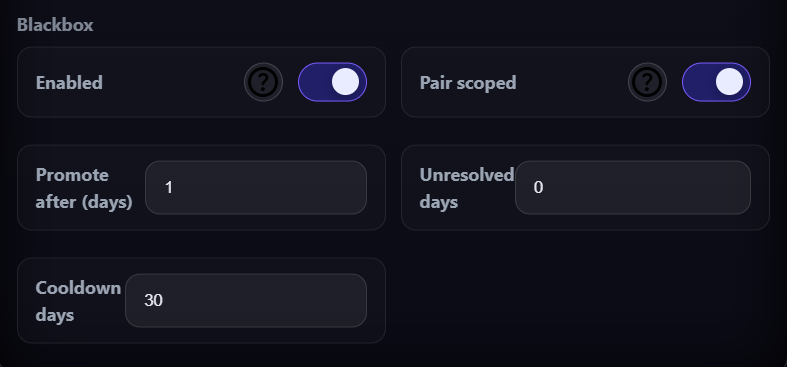
* **Enabled**
* **Pair-scoped**
* **Promote after (failed writes)** — consecutive failed write attempts before an item enters the blackbox
* **Cooldown (days)**
---
# Agent Instructions
This documentation is published with GitBook. GitBook is the documentation platform designed so that both humans and AI agents can read, navigate, and reason over technical content effectively. Learn more at gitbook.com.
## Querying This Documentation
If you need additional information that is not directly available in this page, you can query the documentation by asking a question.
Perform an HTTP GET request on the following URL with the `ask` and `goal` query parameters:
```
GET https://wiki.crosswatch.app/crosswatch/settings/configure-pairs/global-settings.md?ask=&goal=
```
`ask` is the immediate question: it should be specific, self-contained, and written in natural language.
`goal` is what the user is ultimately trying to achieve, the reason they need the answer. Sharing it helps GitBook give you a better, more relevant answer. A goal is most helpful when it describes the outcome the user wants rather than restating the question. For example, with `ask=how do I create an API token`, a goal like `automate deployments from our CI pipeline` lets GitBook tailor the answer to that use case.
The response will contain a direct answer to the question and relevant excerpts and sources from the documentation.
Use this mechanism when the answer is not explicitly present in the current page, you need clarification or additional context, or you want to retrieve related documentation sections.