> For the complete documentation index, see [llms.txt](https://wiki.crosswatch.app/llms.txt). Markdown versions of documentation pages are available by appending `.md` to page URLs; this page is available as [Markdown](https://wiki.crosswatch.app/crosswatch/settings/connections/media-servers/silo.md).
# Silo
Connect Silo to synchronize household watchlists, ratings, history, progress, and playback activity.
{% tabs %}
{% tab title="End users" %}
{% hint style="warning" %}
Silo support is **experimental**. \
Silo remains pre-release. Its API can change before version 1.0.
{% endhint %}
### Connect Silo
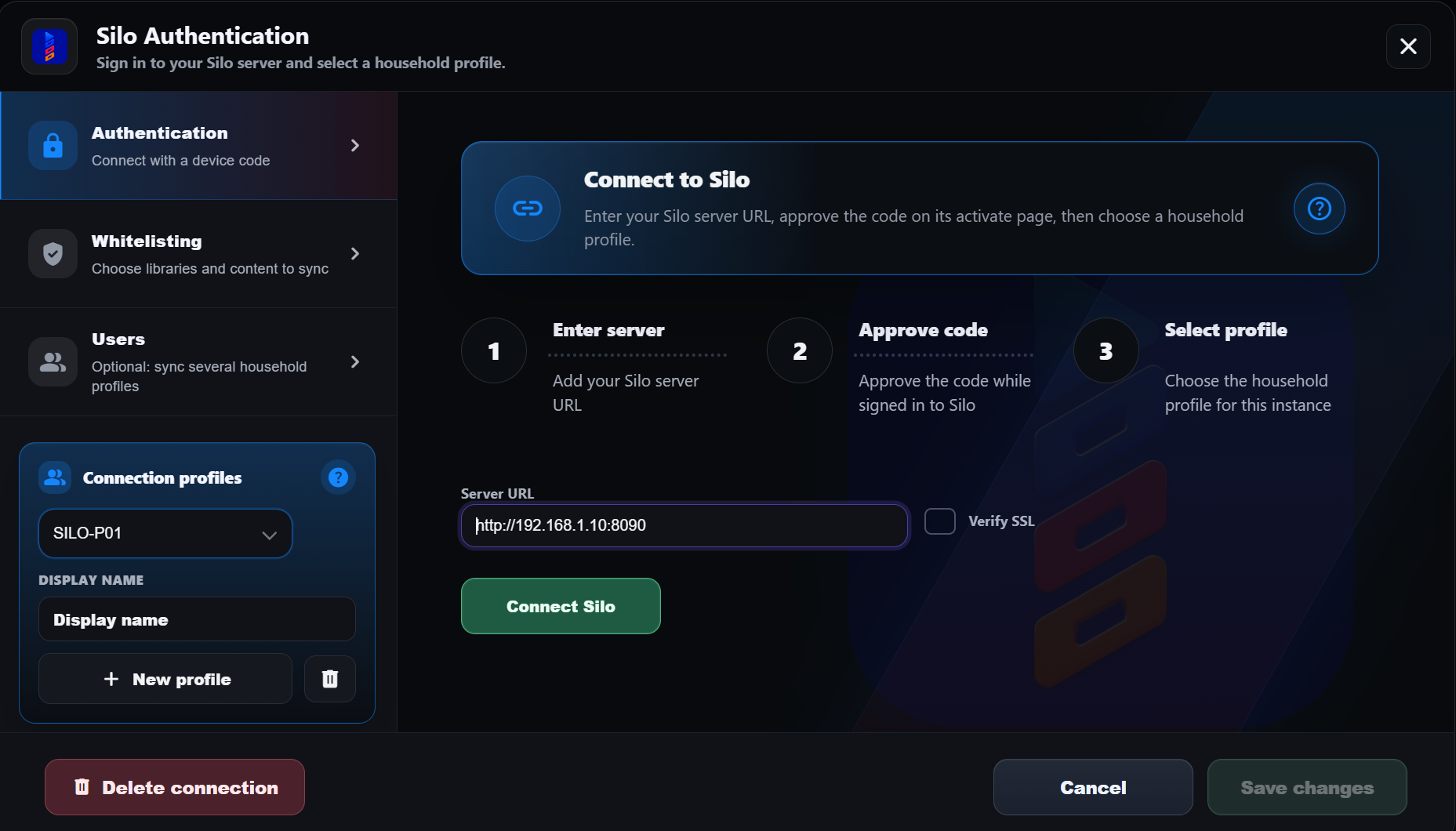
1. Open **Silo** and select the **Authentication** tab.
2. Enter the **Server URL**, such as `http://silo.local:8090`.
3. Select **Connect Silo**.
4. CrossWatch displays a code. Select **Open Silo activate page**.
5. Sign in to Silo and approve the code.
6. Back in CrossWatch, select a household profile under **Silo profile**.
7. Enter the **Profile PIN**, if the profile uses one.
8. Select **Save**.
CrossWatch never receives your Silo password. It does not store profile PINs.
{% hint style="info" %}
Enable device sign-in in the Silo admin settings. Otherwise, CrossWatch reports that device sign-in is disabled.
{% endhint %}
### Silo household profiles
Each Silo account can contain several household profiles. Profiles keep separate watchlists, ratings, history, and progress.
* **Connected profile** — the profile selected during connection.
* **Other household profiles** — the remaining profiles on the same Silo account.
Silo sign-in does not select a profile automatically. CrossWatch always asks which profile to use.
#### Add profiles to a connection
1. Open **Silo** and select the **Users** tab.
2. Select each household profile to include.
3. Enter the PIN once for every protected profile.
4. Select **Save**.
CrossWatch validates a PIN with Silo. It only stores the profile token Silo returns.
Enable **Sync all matched users** in a sync pair or watcher route. Each selected Silo profile then syncs with a same-named Plex, Emby, or Jellyfin user.
Selected profiles support:
* ✅ **Watchlist**, **ratings**, **history**, **progress**, and **collections**
* ✅ **Watcher** and **scrobble** routes
{% hint style="warning" %}
Changing a Silo PIN invalidates its stored token. CrossWatch pauses that profile until you enter the new PIN.
{% endhint %}
You can also create a separate CrossWatch connection for each household profile.
### What to know
* **Library only.** Items must exist in your Silo library. Watchlist titles outside it require Silo **Requests**.
* **Ratings.** Silo supports one to five stars for movies and shows. CrossWatch maps 7/10 to four stars.
* **History.** An unwatched Silo title suppresses its older watches. CrossWatch marks these records unresolved.
* **Finished shows.** Silo hides completed shows from its watchlist. CrossWatch preserves them.
* **Session.** Silo sessions last 30 days. CrossWatch renews active sessions.
{% endtab %}
{% tab title="Power users" %}
### Configuration keys
Silo settings use the `silo.*` prefix.
* `silo.server_url`
* `silo.verify_ssl`
* `silo.access_token` and `silo.refresh_token`
* `silo.profile_id` and `silo.profile_name`
* `silo.profile_token` for PIN-protected profiles
* `silo.sync_users` for selected household profiles
### API
CrossWatch uses the Silo `/api/v2` API. Data requests include `X-Profile-Id`. Protected profiles also use `X-Profile-Token`.
### Related reference
{% content-ref url="/spaces/3rh5THg1PdhVsBt3GALo/pages/bjtQV5hWFetKZdQyIhqn" %}
[Broken mention](broken://spaces/3rh5THg1PdhVsBt3GALo/pages/bjtQV5hWFetKZdQyIhqn)
{% endcontent-ref %}
{% content-ref url="/spaces/3rh5THg1PdhVsBt3GALo/pages/TJM05MdiN6AWdTM1Hpue" %}
[Silo](/crosswatch/settings/synchronization/media-servers/silo.md)
{% endcontent-ref %}
{% endtab %}
{% endtabs %}
---
# Agent Instructions
This documentation is published with GitBook. GitBook is the documentation platform designed so that both humans and AI agents can read, navigate, and reason over technical content effectively. Learn more at gitbook.com.
## Querying This Documentation
If you need additional information that is not directly available in this page, you can query the documentation by asking a question.
Perform an HTTP GET request on the following URL with the `ask` and `goal` query parameters:
```
GET https://wiki.crosswatch.app/crosswatch/settings/connections/media-servers/silo.md?ask=&goal=
```
`ask` is the immediate question: it should be specific, self-contained, and written in natural language.
`goal` is what the user is ultimately trying to achieve, the reason they need the answer. Sharing it helps GitBook give you a better, more relevant answer. A goal is most helpful when it describes the outcome the user wants rather than restating the question. For example, with `ask=how do I create an API token`, a goal like `automate deployments from our CI pipeline` lets GitBook tailor the answer to that use case.
The response will contain a direct answer to the question and relevant excerpts and sources from the documentation.
Use this mechanism when the answer is not explicitly present in the current page, you need clarification or additional context, or you want to retrieve related documentation sections.